
The problem
Asking how the team is doing means asking five people and getting five answers. By the time someone has stitched the spreadsheets together, the numbers describe a month that's already gone.
What Consolidated Reports does
Consolidated Reports reads the live pipeline rather than a monthly export, so the position you're looking at is the current one — by source, by disposition, by person.
Capabilities
What you get with Consolidated Reports
Lead quality at a glance
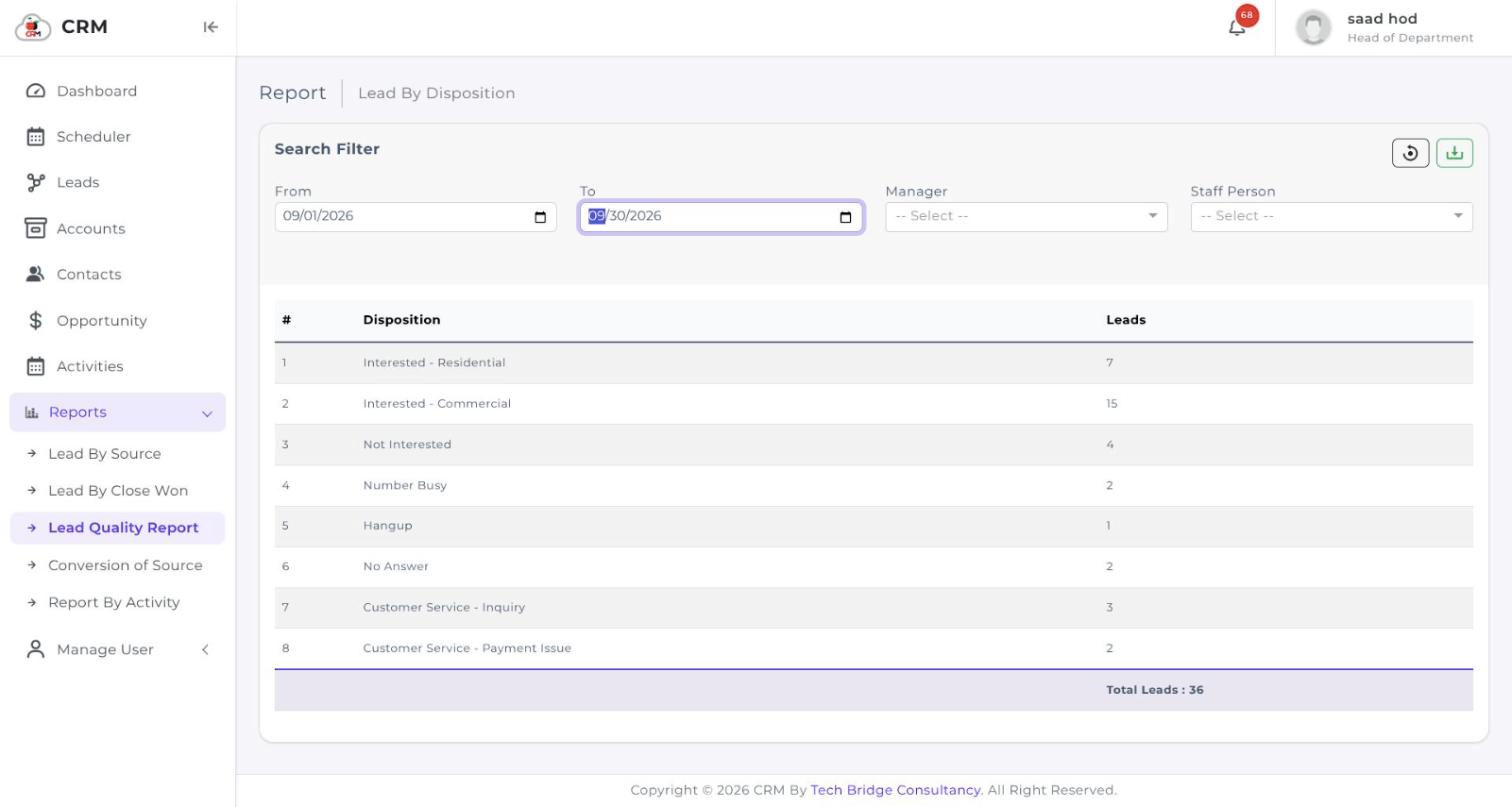
Leads grouped by disposition, so you can see how much of the pipeline is genuinely interested against how much is wrong numbers and no-answers.
Activity by person
A matrix of every user against completed, in-progress, not-started, deferred and cancelled work — the whole team's output on one screen.
Real-time, not month-end
Reports read the live database. There is no close, no export and no waiting for someone to assemble them.
Filter to the question you're asking
Narrow any report by date range, manager or staff member, so the same screen answers a team question and an individual one.
One set of master records
Every report reads the same records the reps work in, which is what keeps two departments' figures agreeing with each other.
Export what you need
Any report exports in a standard format when the numbers have to leave the system for a board pack.
See it running on your own process
Book a walkthrough and we'll show you CherryBerry configured around the way your team actually sells — not a generic demo tenant.